SSH Key Authentication Best Practices
Passwords are the most common authentication method for SSH, but they are also one of the weakest. Brute-force attacks, credential stuffing, and phishing all target password-based logins. SSH key authentication eliminates these risks by using public key cryptography instead.
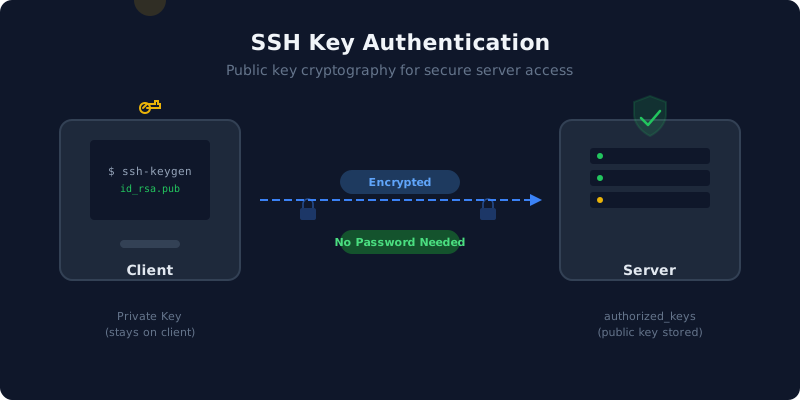
How SSH Key Authentication Works
SSH key authentication uses a pair of cryptographic keys: a private key (kept secret on your machine) and a public key (placed on the server). When you connect, the server sends a challenge that only the holder of the private key can answer. No password ever crosses the network.
- Client initiates an SSH connection to the server
- Server sends a random challenge encrypted with the client's public key
- Client decrypts the challenge using its private key and responds
- Server verifies the response — authentication succeeds
Generating SSH Keys
Use ssh-keygen to generate a key pair. The recommended algorithm today is Ed25519, which offers strong security with short key sizes.
ssh-keygen -t ed25519 -C "your_email@example.com"

# Or use RSA with 4096 bits if Ed25519 is not supported:
ssh-keygen -t rsa -b 4096 -C "your_email@example.com"
This creates two files: ~/.ssh/id_ed25519 (private) and ~/.ssh/id_ed25519.pub (public). The private key should never leave your machine.
Deploying the Public Key
Copy the public key to the server's ~/.ssh/authorized_keys file:
ssh-copy-id -i ~/.ssh/id_ed25519.pub user@yourserver.com

# Or manually:
cat ~/.ssh/id_ed25519.pub | ssh user@yourserver.com \
  "mkdir -p ~/.ssh && chmod 700 ~/.ssh && cat >> ~/.ssh/authorized_keys && chmod 600 ~/.ssh/authorized_keys"
Best Practices
1. Always Use a Passphrase
When generating keys, set a strong passphrase. This encrypts the private key on disk, so even if an attacker copies the file, they cannot use it without the passphrase.
2. Disable Password Authentication
Once key authentication is working, disable password-based logins entirely by setting these in /etc/ssh/sshd_config:
PasswordAuthentication no
ChallengeResponseAuthentication no
UsePAM no
Restart the SSH service afterward. This eliminates brute-force password attacks completely.
3. Use One Key Per Device
Generate separate key pairs for each device (laptop, desktop, CI server). If a device is compromised, you only need to revoke one key from authorized_keys rather than re-keying everything.
4. Restrict Key Permissions
OpenSSH is strict about file permissions. Ensure correct ownership and modes:
chmod 700 ~/.ssh
chmod 600 ~/.ssh/id_ed25519
chmod 644 ~/.ssh/id_ed25519.pub
chmod 600 ~/.ssh/authorized_keys
5. Rotate Keys Periodically
Treat SSH keys like passwords — rotate them periodically. Generate new keys, deploy the new public key, verify access, then remove the old key from authorized_keys.
6. Use SSH Agent for Convenience
Instead of typing your passphrase on every connection, use ssh-agent to cache the decrypted key in memory:
eval "$(ssh-agent -s)"
ssh-add ~/.ssh/id_ed25519
On macOS, add --apple-use-keychain to integrate with the system keychain.
Common Mistakes to Avoid
- Sharing private keys: Never copy private keys between machines. Generate a new pair for each device.
- Using outdated algorithms: Avoid DSA (deprecated) and RSA keys shorter than 2048 bits. Prefer Ed25519.
- Leaving default passwords enabled: If you configure key auth but leave password auth on, attackers can still brute-force passwords.
- Ignoring authorized_keys bloat: Old, unused keys accumulate over time. Audit the file regularly and remove keys that are no longer in use.
For SFTP Users
SSH key authentication is especially useful for SFTP accounts. Automated systems that transfer files on a schedule (backups, data syncs, ETL pipelines) benefit from key-based auth because no password needs to be stored in plaintext configuration files. Combined with chroot jails, you get both strong authentication and filesystem isolation.