Securing SFTP with Chroot Jails
When you provide SFTP access to external users or clients, one of the most critical security measures is preventing them from navigating outside their designated directory. This is where chroot jails come in.
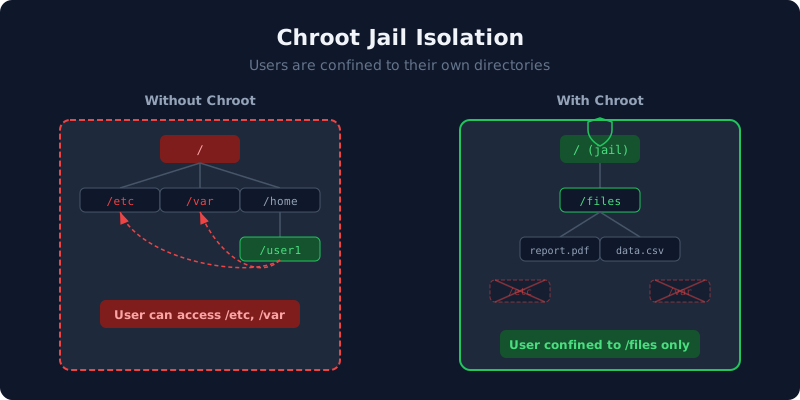
What is a Chroot Jail?
A chroot ("change root") jail changes the apparent root directory for a running process. When applied to an SFTP session, the user sees their home directory as the filesystem root (/). They cannot navigate above it, access system files like /etc/passwd, or see other users' directories.
How OpenSSH Implements Chroot
OpenSSH's ChrootDirectory directive in sshd_config enforces the jail. When configured, the SFTP subsystem changes the root directory before granting the user access.
Requirements for Chroot
- The chroot directory must be owned by root
- The chroot directory must not be writable by any other user or group
- A writable subdirectory (e.g.,
/files) inside the chroot is needed for the user to actually upload files - The user's shell must be set to
/usr/sbin/nologinor/bin/false
Typical Directory Structure
/home/sftpuser/          # owned by root:root, 755
  /home/sftpuser/files/  # owned by sftpuser:sftpuser, 755
Setting Up a Chrooted User
The typical steps to configure a chrooted SFTP user are:
- Create the system user with
/usr/sbin/nologinas the shell - Set the home directory ownership to root with correct permissions (755)
- Create a writable subdirectory (e.g.,
/files) owned by the SFTP user - Add the user to a dedicated group (e.g.,
sftpusers) - Add a
Match GrouporMatch Userblock insshd_configwithChrootDirectory - Restart the SSH service for changes to take effect
Automating these steps through scripts or management tools reduces the risk of misconfiguration and ensures consistent setup across all users.
Common Chroot Pitfalls
- Wrong ownership: If the chroot directory is not owned by root, SSH will reject the connection with a cryptic error.
- Writable chroot root: The chroot directory itself must not be writable by the user. Only subdirectories should be writable.
- Missing sshd restart: After modifying sshd_config, you must restart the SSH service for changes to take effect.
- Incorrect Match block: sshd_config Match blocks must be at the end of the file and properly scoped.
Testing Your Chroot Setup
After creating a chrooted user, test the jail:
sftp username@yourserver.com
sftp> pwd
Remote working directory: /
sftp> ls
files
sftp> cd /etc
Couldn't stat remote file: No such file or directory
The user sees / as their root and cannot access system directories.