SFTP vs FTP: Why You Should Never Use Plain FTP
FTP (File Transfer Protocol) was designed in 1971 — decades before internet security was a serious concern. Despite its age and well-known vulnerabilities, many organizations still use plain FTP for file transfers. Here's why you should switch to SFTP immediately.
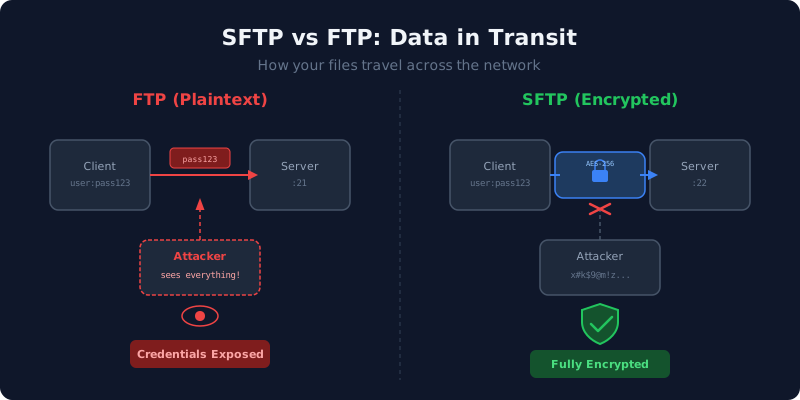
What is FTP?
FTP transfers files over two separate TCP connections: a control channel (port 21) for commands and a data channel for file content. By default, everything is transmitted in plaintext — including usernames, passwords, and file data.
What is SFTP?
SFTP (SSH File Transfer Protocol) runs entirely over an encrypted SSH connection (port 22). It is not FTP over SSH — it is a completely different protocol that happens to provide similar file-transfer functionality.
Security Comparison
| Feature | FTP | SFTP |
|---|---|---|
| Encryption | None (plaintext) | Full encryption (SSH) |
| Authentication | Plaintext password | Password or SSH keys |
| Port | 21 (+ dynamic data ports) | 22 (single port) |
| Firewall friendly | No (requires port range) | Yes (single port) |
| Chroot support | Varies by server | Built into OpenSSH |
| Data integrity | No verification | HMAC verification |
| Compliance | Fails most audits | PCI DSS, HIPAA compatible |
Why FTP is Dangerous
- Credential theft: Anyone on the network path can capture FTP usernames and passwords using packet sniffing tools like Wireshark.
- Data exposure: File contents are transmitted unencrypted. Sensitive documents, databases, and source code are visible to anyone intercepting the connection.
- Man-in-the-middle attacks: Without encryption, attackers can modify files in transit without detection.
- Compliance violations: PCI DSS, HIPAA, SOC 2, and other standards require encrypted file transfers. Plain FTP fails these requirements.
What About FTPS?
FTPS (FTP over TLS/SSL) adds encryption to the FTP protocol. While more secure than plain FTP, it still has drawbacks:
- Requires certificate management
- Still uses multiple ports (firewall complexity)
- Separate software from SSH (additional attack surface)
- Less standardized chroot support
SFTP is generally preferred because it reuses the existing SSH infrastructure that every Linux server already has.
Migrating from FTP to SFTP
- Ensure OpenSSH is installed and running on your server
- Create SFTP user accounts with appropriate permissions
- Configure chroot jails for user isolation
- Update client applications to use SFTP (port 22) instead of FTP (port 21)
- Disable the FTP server and close port 21 in your firewall
- Update DNS records if you had a dedicated FTP hostname